How I Built a Production SaaS in 2 Weeks
How I Built a Production-Ready SaaS in 2 Weeks Instead of 2 Months
My Third Time Building the Same Infrastructure (And Why I Finally Said “Enough”)
I still remember the exact moment I decided I was done wasting time. It was 2 AM on a Tuesday, and I was debugging yet another Stripe webhook issue on my third SaaS project in 18 months. The problem? I was rebuilding the exact same authentication system, payment integration, and team management features I’d built twice before.
Three projects. Three times writing OAuth flows. Three times setting up role-based permissions. Three times implementing Stripe subscriptions from scratch.
Sound familiar?
Press enter or click to view image in full size

Figure 1: The reality of building SaaS infrastructure from scratch — countless late nights debugging authentication flows versus the speed of pre-built solutions.
The Problem Every Vue Developer Faces (But Nobody Talks About)
Here’s the uncomfortable truth: if you’re a Vue/Nuxt developer who wants to build a SaaS product, you’re starting from scratch every single time. Sure, there are templates for React developers — MkSaaS, Supastarter, and dozens of others. But for Vue? The ecosystem is practically empty.
I know because I looked. Extensively.
The options were:
Build everything yourself (4–6 weeks of infrastructure work before touching your actual product)
Learn React (because that’s where all the templates are)
Use a generic template that doesn’t understand Nuxt 3’s auto-imports, server routes, or Vue Composition API
None of these options felt right. I love Vue. I’m productive in Vue. Why should I abandon my entire tech stack just because someone decided React deserves all the developer tools?
What Actually Takes Time When Building a SaaS
Let me break down where those “4–6 weeks of infrastructure” actually go:
Week 1–2: Authentication Hell
Email/password authentication with verification
OAuth integration (Google, GitHub, Discord)
Password reset flows
Session management
2FA implementation
Week 3: Payment Integration Nightmare
Stripe checkout implementation
Subscription plan management
Webhook handling (with proper retry logic!)
Customer portal integration
Invoice generation
Week 4: Teams & Permissions
Multi-tenant architecture
Team/organization creation
Member invitation system
Role-based access control (Owner, Admin, Member)
Team billing
Week 5–6: The “Everything Else”
Admin dashboard
Email templates
SEO optimization
Deployment configuration
Error handling & logging
And here’s the kicker: None of this is your actual product. It’s all undifferentiated heavy lifting — necessary, but not unique to your business.
Press enter or click to view image in full size
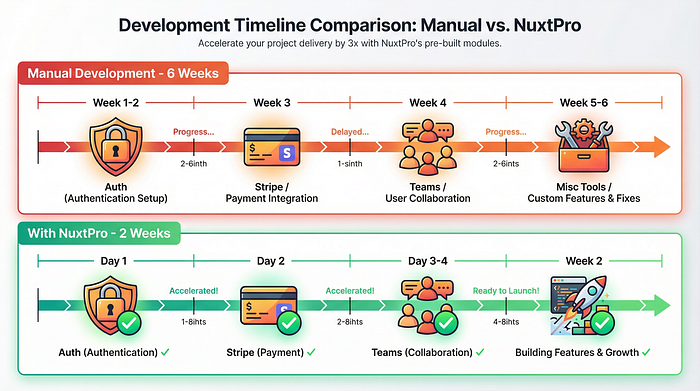
Figure 2: Development timeline comparison showing how NuxtPro compresses 6 weeks of infrastructure work into 2 weeks by providing pre-built Auth, Stripe, and Teams features.
My “Aha” Moment
After building the same infrastructure three times, I had a realization: I’d spent roughly 12 weeks (3 projects × 4 weeks each) on boilerplate code. That’s three months of my life I could have spent building actual features, talking to customers, or literally anything else.
So I did something different for my fourth project.
Enter NuxtPro: Built by a Vue Developer, For Vue Developers
I discovered NuxtPro through a Reddit thread on r/vuejs where someone asked, “Is there a MkSaaS equivalent for Nuxt?” The top comment mentioned NuxtPro, and I’ll admit — I was skeptical.
Another boilerplate? How is this different?
But three things caught my attention:
It’s actually built for Nuxt 3 (not a React template with Vue slapped on)
It costs $158 (vs. $349 for Supastarter or $249+ for other alternatives)
The creator is an indie developer sharing his journey publicly (@PennyJoly on Twitter)
I bought it. Not because I believed in it, but because $158 was cheaper than spending another 4 weeks rebuilding authentication.
What Happened Next Surprised Me
Day 1: I ran npx create-nuxtpro-app my-project and had a working app with authentication in under 30 minutes. Not a prototype. Not a "hello world." A production-ready auth system with:
Email/password login ✓
Google OAuth ✓
Email verification ✓
Password reset ✓
Session management ✓
Day 2: Stripe integration. I expected this to take 2–3 days based on my previous experiences. It took 4 hours. The webhook handling alone saved me probably 8 hours of debugging (if you’ve ever dealt with Stripe webhooks, you know what I mean).
Day 3–4: Teams and organizations. This is where NuxtPro really shined. The multi-tenant architecture was already there. Role-based permissions? Done. Member invitations? Working out of the box.
Week 2: I was building my actual product. Not infrastructure. Not boilerplate. My actual unique features.
Actual product screenshot with annotations highlighting key features: OAuth buttons, email verification, session management
The Technical Differences That Actually Matter
Let me get technical for a moment, because this is where NuxtPro proves it’s not just another template:
1. Built for Nuxt 3’s Philosophy
// Other templates make you do this:
import { useAuth } from '@/composables/auth'
import { defineComponent } from 'vue'

export default defineComponent({
  setup() {
    const auth = useAuth()
    // ...
  }
})

// NuxtPro leverages auto-imports:
<script setup>
const { user, signIn } = useAuth() // Just works™
</script>
2. Server Routes That Make Sense
NuxtPro’s API structure follows Nuxt 3’s server directory convention:
server/
├── api/
│   ├── auth/
│   │   ├── login.post.ts
│   │   ├── register.post.ts
│   │   └── verify.get.ts
│   ├── stripe/
│   │   ├── checkout.post.ts
│   │   └── webhook.post.ts
│   └── teams/
│       ├── create.post.ts
│       └── [id]/
│           └── members.get.ts
This isn’t just clean — it’s how Nuxt 3 wants you to structure APIs.
3. Vue Composition API Throughout
No class components. No Options API. Pure Composition API with composables:
// User management
const { user, isAuthenticated } = useAuth()

// Team operations
const { currentTeam, switchTeam } = useTeam()

// Subscription status
const { subscription, hasActiveSubscription } = useSubscription()
The Real ROI: Time and Sanity
Let’s do the math:
Manual Development:
Auth system: 80 hours
Stripe integration: 60 hours
Teams/Organizations: 70 hours
Total: 210 hours at $100/hour = $21,000
With NuxtPro:
Setup time: 2 hours
Customization: 10 hours
Total: 12 hours at $100/hour = $1,200
NuxtPro cost: $158
Real total: $1,358
Savings: $19,642 and 198 hours
But here’s what the math doesn’t show:
Zero “authentication headaches” at 2 AM
No debugging Stripe webhooks for the third time
No reinventing the wheel on role permissions
Starting your actual product on Day 1, not Week 5
Press enter or click to view image in full size
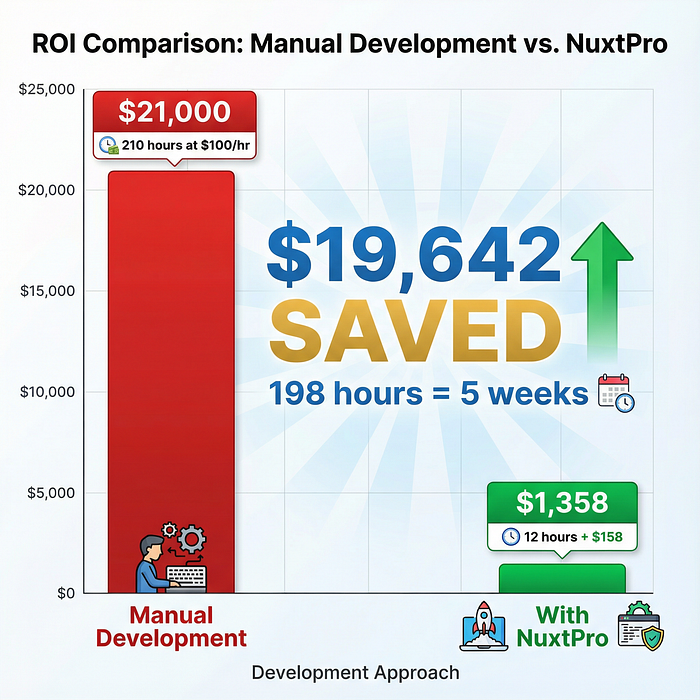
Figure 3: Visual breakdown of the $19,642 savings when using NuxtPro instead of building authentication, payments, and teams from scratch — representing 198 hours (nearly 5 weeks) of development time.
What About the Alternatives?
I evaluated several options before choosing NuxtPro:
MkSaaS ($169):
Excellent template, but it’s Next.js/React. I’d need to relearn React patterns, convert my Vue components, and lose all my Nuxt-specific optimizations.
Supastarter ($349):
Solid multi-framework support including Nuxt, but $349 felt steep for a side project. Also, the Nuxt version felt like an afterthought compared to their Next.js version.
Nuxt UI Pro ($249-$999):
Official Nuxt Labs product, but it’s focused on UI components rather than full SaaS infrastructure. Still need to build auth, payments, teams yourself.
NuxtPro ($158):
Purpose-built for Vue/Nuxt developers. Includes everything needed for production SaaS. Active development and responsive creator. Price point makes it a no-brainer for indie developers.
Press enter or click to view image in full size
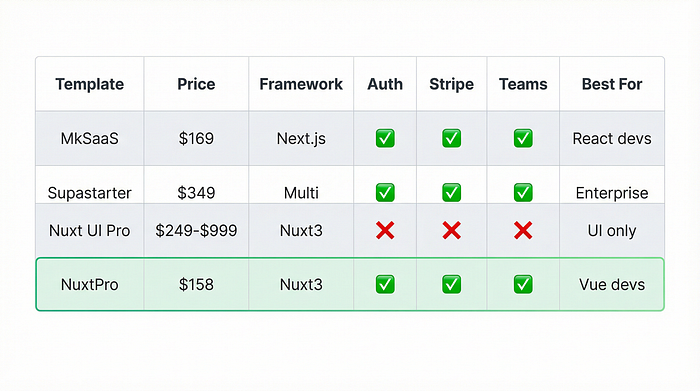
Figure 4: Comprehensive comparison of leading SaaS templates showing NuxtPro as the only affordable, full-featured option specifically built for Vue/Nuxt developers.
The Unexpected Benefits
Beyond the obvious time savings, I discovered some unexpected advantages:
1. Best Practices Baked In
NuxtPro’s code follows Nuxt 3 conventions perfectly. I learned better patterns just by reading through the implementation.
2. Production-Ready from Day One
Error boundaries, loading states, TypeScript types — everything you’d eventually add is already there.
3. Actually Maintained
Kevin (the creator) ships updates monthly. When Nuxt 3.5 came out with new features, NuxtPro was updated within days.
4. Community
Small but active Discord. Unlike massive communities where questions get lost, here you get actual responses from people who’ve shipped products using NuxtPro.
Is It Perfect? No. (And Why That’s Okay)
Let’s be honest about limitations:
It’s Opinionated
NuxtPro makes architectural decisions for you. If you hate Pinia for state management or prefer a different auth approach, you’ll fight the template.
Smaller Ecosystem
With 8 customers when I bought it (now 30+), you’re not getting Stack Overflow-level support. You need to be comfortable reading code.
One-Person Show
Kevin is incredibly responsive, but it’s still one person. If he gets hit by a bus tomorrow, updates stop.
That said? None of these mattered for me. The time savings alone made it worth the “risk.”
Who Should (And Shouldn’t) Use NuxtPro
You Should Use NuxtPro If:
You’re a Vue/Nuxt developer building a SaaS
You value speed over customization
You’re building your first or second SaaS product
Your budget is limited ($158 vs. weeks of development)
You want to focus on your unique features, not boilerplate
Skip NuxtPro If:
You prefer React/Next.js (use MkSaaS instead)
You need enterprise-level support contracts
Your architecture is so unique that templates won’t help
You enjoy building authentication systems from scratch (no judgment!)
The Actual ROI: Two Shipped Products
Since discovering NuxtPro, I’ve shipped two products:
Product 1: SaaS analytics tool
Built in: 3 weeks (vs. 8–10 weeks manually)
Status: $2,400 MRR with 40 customers
NuxtPro saved me: ~6 weeks
Product 2: Team collaboration tool
Built in: 2.5 weeks
Status: Beta with 15 paying customers
NuxtPro saved me: ~6 weeks again
That’s 12 weeks saved across two projects. At my freelance rate of $100/hour, that’s $48,000 in time savings for a $158 investment.
But the real win? I shipped two products in the time it would have taken me to build one the old way.
Press enter or click to view image in full size
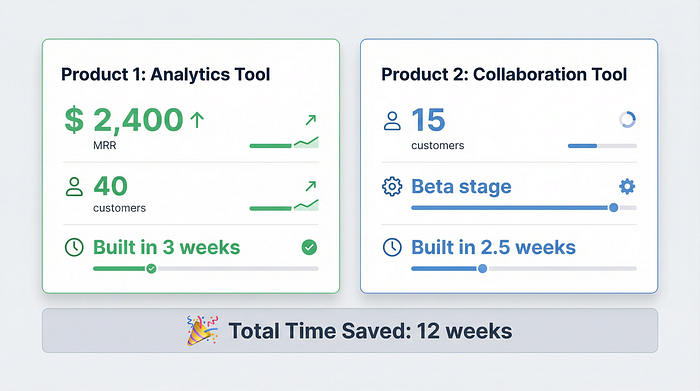
Figure 5: Two real products shipped using NuxtPro, demonstrating 12 weeks of total time savings — proving the ROI of investing $158 to accelerate product launches instead of rebuilding infrastructure.
My Recommendation
If you’re a Vue/Nuxt developer planning to build a SaaS product, here’s my advice:
Don’t spend $349 on Supastarter unless you need multiple framework support.
Don’t switch to React just for better templates.
Don’t spend 4–6 weeks rebuilding authentication for the Nth time.
Do consider NuxtPro. At $158, even if it only saves you 2 weeks of work, it’s worth it. And based on my experience, it’ll save you much more than that.
Getting Started
If you want to try NuxtPro:
Visit nuxtpro.com
Check out the open-source starter (free)
If it fits your needs, grab the full version ($158)
Join the Discord for implementation help
I’m not affiliated with NuxtPro (just a happy user), but Kevin’s on Twitter @PennyJoly if you have questions. He’s surprisingly responsive for someone shipping monthly updates.
Final Thoughts
Building SaaS products should be about solving problems for customers, not reinventing authentication systems. NuxtPro gave me back my time and sanity.
If you’re a Vue developer who’s been hesitant to start that SaaS idea because the infrastructure work seems daunting — this is your solution.
Stop building boilerplate. Start building products.
Have you used any SaaS templates? What was your experience? Drop a comment below — I’d love to hear your perspective.
P.S. — If this helped you, consider following me for more Vue/Nuxt development insights. I share my indie hacking journey weekly.